accent-color and AccentColor
TLDR;
The accent-color CSS property sets the color of HTML form controls. The AccentColor keyword gets that color.
Browser support
This feature is not yet implemented in any browser but you can vote for its inclusion in Interop 2027.
Trying, and failing, to reflect user preferences via AccentColor
A few years ago I penned an article titled User-adaptive interfaces with AccentColor. I was excited about a future where websites could reflect user preferences beyond dark mode, such as the color preference for form elements. Unfortunately, due to finger-printing concerns, the originally-planned functionality of AccentColor was curtailed. Chrome/Edge and Safari return rgb(0, 122, 255) (a shade of blue), regardless of your personal system setting.
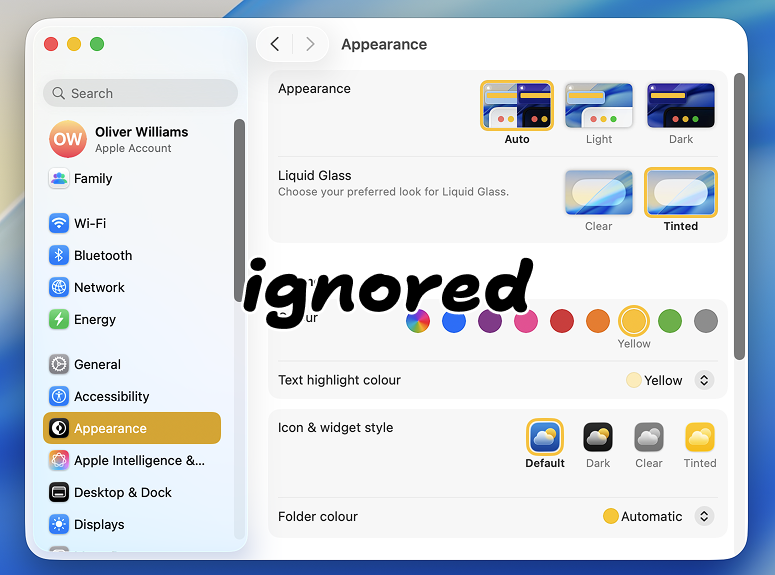
Unable to reflect OS-level color preferences, AccentColor, had become a pointless keyword, totally unused by developers… but the story didn’t end there. Instead, its taken on a new use case.
Referencing accent-color via AccentColor
The CSS accent-color property sets the color of the following HTML elements: <input type="checkbox">, <input type="checkbox" switch>, <input type="radio">, <input type="range"> and <progress></progress>.
:root {
    accent-color: green;
}
AccentColor reflects the value of the accent-color property. Given the above code, AccentColor will be green.
Why is this better than a CSS variable?
You could just call a CSS variable --AccentColor, so why does this even matter?
:root {
    --AccentColor: green;
}
Currently, every component library takes a different approach: one might call a CSS custom property --ui-accent, another --primary, or --accent-color, or --checked. Some projects don’t even use a CSS variable for this whatsoever. Once AccentColor is broadly adopted across component libraries, setting the accent-color property will be a consistent way for consumers of those projects to style both native HTML form controls and custom form controls. Rather than needing to consult documentation to discover the unique way a form control is styled, this will provide a standard approach.
This might not seem like a mindblowing feature: its just a way to set a color, but it does provide an interoperable approach that can be used by all design systems, regardless of whether they’re using Tailwind, CSS-in-JS, Sass, or whatever. Its often said that naming things is one of the hardest problems in computer science. This is one name you won’t have to think about.