Do we still need build tools?
How necessary are build tools for frontend development in 2026? Let’s take a look.
Do we still need build tools for CSS?
Prefixes
Autoprefixer, esbuild and Lightning CSS can automatically add vendor prefixes to CSS. This week, Autoprefixer was downloaded from NPM 49,587,933 times. If your codebase doesn’t include the stretch keyword, user-select, or box-decoration-break, there’s no reason to use a prefixing tool. There are other properties, values and selectors that require a prefix, but because they don’t have a standard equivalent, they have to be written manually: e.g. -webkit-text-stroke, -webkit-text-fill-color, -webkit-line-clamp and ::-webkit-scrollbar. If you write text-stroke in your CSS, for example, tools like Autoprefixer won’t add the -webkit prefix because text-stroke is not a standardised CSS property.
Unprefixing user-select is part of Interop 2026 so will happen at some point this year.
Syntax lowering
“Syntax lowering” means taking modern CSS and transforming it to be compatible with older browsers. PostCSS was first to offer this functionality, and has been followed by esbuild and Lightning CSS (which is used by Bun, Rspack and Turbopack).
The lowered features differ slightly between tools but can include:
- modern colors like
lab(),lch(),oklab(),oklch(),color(),hwb(), hex colors with alpha and modern RGB/HSL syntax. color-mix()- the
insetshorthand - nesting
- gradient interpolation
light-dark()- logical properties
system-uifont- Match functions like
round(),mod(),cos(),tan(),pow()etc
These features are either baseline widely available already (meaning they have been supported by all browsers for at least two and a half years), or will become so later this year. Some, like inset and the system-ui value for font-family, have been supported for far longer.
Syntax lowering comes with severe caveats. While a simple shorthand property like inset can be easily transformed into longhand, the full functionality of a feature like light-dark() cannot be emulated with any fidelity. There is rarely a way for a build tool to make a new CSS feature “just work” in exactly the same way it works in the latest browsers. Pretending to use a feature, while the output code is something very different, can end up being more confusing than helpful. And having a disconnect between what’s in your authored code and what shows up in devtools makes debugging harder.
Preprocessors: Sass and Less
Sass was once a wildly popular tool but has mostly fallen out of favour as its best features have been adopted into CSS, often in an improved form. That started with CSS custom properties and continued with nesting. Nesting has been supported by all browsers since 2023. CSS color functions like alpha(), color-mix() and CSS relative color are improvements over Sass color functions. Sass has deprecated its own if() function in favor of the official CSS if() syntax. Chrome has shipped if() and @function and it’s possible those features will gain broader browser support in the future. There’s also a CSS spec for mixins which is currently being implemented in Chromium by the Microsoft Edge team.
@import bundling
Tools like esbuild, PostCSS Bundler, postcss-import, and Lightning CSS can combine CSS files referenced by @import into a single .css output file. Similarly, Sass has its own unique way to combine multiple .scss files into a single .css file. If you’re authoring more than a handful of CSS files, combining them together is one build step that will remain highly recommended.
In a no-build project, every CSS file you author needs its own CSS @import statement or a link tag — meaning each file is a separate HTTP request. David Heinemeier Hansson, the creator of Ruby on Rails, has been one of the few high-profile public advocates of a pure no-build approach to frontend development. On Hey.com, developed by DHH’s company, there are 147 <link rel="stylesheet"> elements in the <head> of the document. The site isn’t slow. It achieves 94 on a Lighthouse performance test, but its a difficult practice to justify at such a scale and certainly isn’t optimal.
ONCE #1 is completely #NoBuild for the front-end. No bundling, no transpiling, no nothing. Just individual, vanilla CSS and JavaScripts served over HTTP/2. It's amazingly light and amazingly fast with exquisite cache expiration dynamics. Bliss to develop for too! pic.twitter.com/BdBFX9BkXW
— DHH (@dhh) December 18, 2023
Jake Archibald has written about the compression benefits of combining resources:
A big part of gzip and brotli compression involves back-references, eg “the next 50 bytes are the same as this bit earlier in the resource”. That can only happen in a single resource, so compressing lots of small resources is less efficient than compressing one combined resource.
Minification
Minification strips out comments and whitespace. Minification of CSS remains a best practice.
Do we still need build tools for JavaScript?
Bundling ECMAScript Modules
JavaScript module bundlers include Parcel, Bun, Rspack, Webpack, Turbopack, esbuild, Rollup and its successor Rolldown (which is used by Vite).
There are various performance tradeoffs to bundling. Bundling harms caching granularity. When one small module changes, the entire bundle gets invalidated. That is largely outweighed by the positives:
- gzip / brotli compression is more efficient when performed on larger files rather than on a lot of smaller files.
- Bundlers can eliminate unused code.
- Bundlers reduce waterfalls by flattening the import chain.
- Even with HTTP/2 and HTTP/3, the sheer number of HTTP requests still matters.
The Why do we still need bundlers? page in the Rolldown docs argues:
Although HTTP/2 theoretically supports unlimited multiplexing, most browsers / servers have a default limit of around 100 on the maximum number of concurrent streams per connection. Every network request also comes with fixed overhead (header processing, TLS encryption, multiplexing, etc.) on both the server and the client. More requests means more server load, and the actual concurrency is limited by how fast your server can serve the module files. Applications that contain thousands of unbundled modules will still create serious network bottlenecks even under HTTP/2.
While the performance benefits of bundling absolutely outweigh any negatives, if you have a small amount of JavaScript files, not bundling is perfectly viable. A post on the V8 blog from 2018 states that it’s fine to skip bundling for web apps “with less than 100 modules in total and with a relatively shallow dependency tree (i.e. a maximum depth less than 5)”.
Modern JavaScript can totally be shipped #nobuild. When I was in Chrome, we experimented with how feasible this was at scale. You can load around 50-100 smaller scripts/chunks before the cost of IPC benefits from using a bundler/tooling. But you can go pretty far.
— Addy Osmani (@addyosmani) May 2, 2026
Importing more than ES Modules
Some bundlers bundle more than JavaScript modules. Webpack pioneered importing other resource types into JavaScript via what Webpack called “loaders”. To some degree, equivalent functionality has made its way into web standards. Importing JSON via import attribute syntax has been supported by all browsers since early 2025. CSS module scripts are supported by Chrome/Edge and Firefox. And importing text recently landed in Firefox 153. There’s also a spec for importing bytes, but that isn’t implemented in browsers yet.
import json from "./data.json" with { type: "json" };
import text from "/file.txt" with { type: "text" };
import bytes from "./photo.png" with { type: "bytes" };
import styles from "./styles.css" with { type: "css" };
document.adoptedStyleSheets.push(styles);
Avoiding waterfalls with modulepreload
If module A imports module B, and module B imports module C, only after module A has loaded does the browser discover and fetch module B, and so on. The chain of nested imports means the modules are late-discovered. This creates a waterfall — a series of sequential requests. Multiple network roundtrips are necessary to fetch the entire module graph. HTTP/2 & HTTP/3 don’t help with this issue. Bundling isn’t the only solution. By preloading the files, the browser knows about them all ahead of time and can fetch them in parallel, instead of one after the other.
Managing preload statements is its own burden. To take one real-world example, the Hey email web app has 259 <link rel="modulepreload"> elements in the <head>. Some tools, like the backend framework Ruby on Rails, provide help.
It’s recently become possible to preload other module types. In Chrome, Edge and Safari, JSON can be preloaded via modulepreload in the <head>. Chrome/Edge can also preload CSS. According to the HTML spec, it should also be possible to preload text, but that isn’t implemented anywhere yet.
<link rel="modulepreload" as="style" href="/styles.css">
<link rel="modulepreload" as="json" href="/data.json">
<link rel="modulepreload" as="text" href="/file.txt">
Third-party dependencies
When bundlers first became popular within frontend development, their primary selling point wasn’t performance optimisation. Bundlers were, and remain, the only way to take CommonJS dependencies that can’t run in the browser and make it so they can - but that’s a largely obsolete problem. Standard ES modules (ESM) have been supported in all browsers since 2018 and the ecosystem has slowly caught up. The amount of packages on NPM published only in ESM format has gone from just 6% in 2021 to 16% now. Dependencies published in a dual format supporting both ESM and CJS have gone from 1.7% in 2021 to 22% today. There are still plenty of backend/Node-focused packages and unmaintained legacy packages released only as CommonJS but any sane frontend package published anytime recently will be published as ESM.
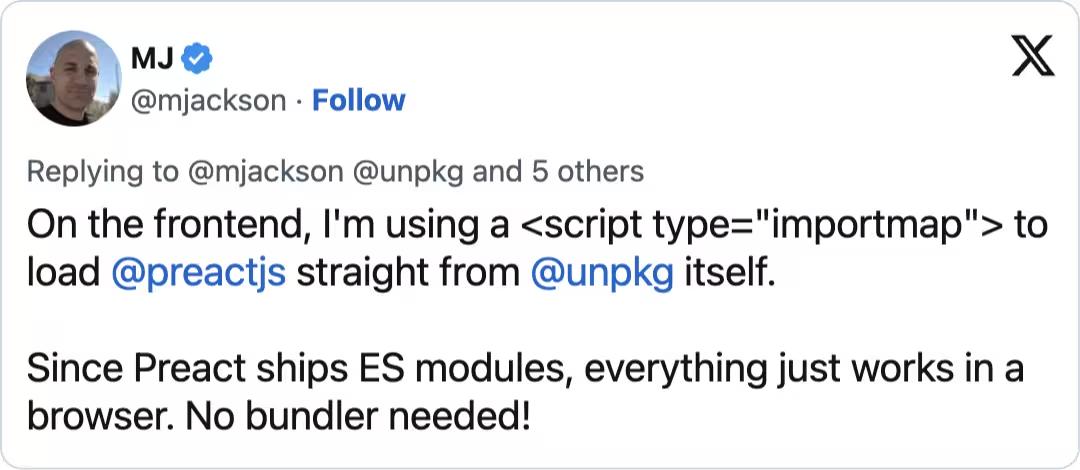
Another important piece of the puzzle, import maps, have had full browser support since early 2023, and are used by Shopify, a complex mega-scale web application. Despite all that, using packages without a bundler is harder than it should be.
The simplist approach to using dependencies from the NPM (or JSR) registry is via a public CDN like esm.sh, UNPKG or JSPM using an import map.
<script type="importmap">
  {
    "imports": {
      "lit": "https://esm.sh/[email protected]"
    }
  }
</script>
This works well, but the drawback is you have no control over uptime. esm.sh and UNPKG are great projects, but in the long-term there’s the chance they could become unmaintained (like Skypack) or pose security concerns (like polyfill.io) or go offline altogether (like RawGit).
What if you’d prefer to self-host your dependencies? Simon Willison, co-creator of the Django framework, has written on his blog:
I sometimes think the hardest problem in computer science right now is taking an NPM library and figuring out how to download it and use it from a
<script>tag without needing to involve some sort of convoluted build system.
Before NPM and bundling became popular, it was common practice to vendor your dependencies. Developers manually downloaded or copy-pasted the jQuery source code (to take one example) into their own project. However antiquated it might seem, for websites with one or two dependencies that rarely get updated, this offers a better DX than modern practices. However, if you have a large amount of dependencies that are updated often, the benefit of NPM is sizeable. To check if any of your installed packages are out of date, you simply run npm outdated. Running one single command, npm update, will update all the packages to the latest version. Using NPM also enables you to receive security alerts about the packages you’ve installed. But the most important aspect of NPM is transitive dependencies.
Some projects, like jQuery and HTMX, are self-contained: they don’t import any other dependencies. That makes downloading and using them incredibly simple. But what happens when a dependency has its own dependencies? Here’s the creator of HTMX explaining the issue:
“Vendoring also has one massive drawback: there typically isn’t a good way to deal with what is called the transitive dependency problem. If htmx had sub-dependencies, that is, other libraries that it depended on, then to vendor it properly you would have to start vendoring all those libraries as well. And if those dependencies had further dependencies, you’d need to install them as well… And on and on.”
Package managers like NPM, Yarn, pnpm, and Bun download the entire dependency tree. Running npm i lit, for example, also downloads all the dependencies of Lit. But despite downloading all the needed code, you can’t just use it on the frontend… It’s tempting to attempt:
<script type="importmap">
    {
          "imports": {
            "lit": "/node_modules/lit/index.js",
        }
    }
</script>
But you’d actually need to map every transitive dependency as well. In the case of the Lit example, that would be:
<script type="importmap">
    {
          "imports": {
            "lit": "/node_modules/lit/index.js",
            "@lit/reactive-element": "/node_modules/@lit/reactive-element/reactive-element.js",
            "lit-html": "/node_modules/lit-html/lit-html.js",
            "lit-html/": "/node_modules/lit-html/",
            "lit-element": "/node_modules/lit-element/index.js",
            "lit-element/": "/node_modules/lit-element/"
        }
    }
</script>
Writing an import map by hand can get complicated enough that there’s a tool — JSPM — that promises to make “working with import maps simpler by automating their creation and management.”
Lea Verou, a former member of the W3C Technical Architecture Group, has written about the topic of web dependencies at length and explains the problem of directly using code within node_modules:
First, deploying your entire node_modules directory is both wasteful, and a security risk. In fact, most serverless hosts (e.g. Netlify or Vercel) automatically remove it from the publicly deployed files after the build is finished.
Additionally, it violates encapsulation: paths within a package are generally seen as an implementation detail of the package itself.
The reality is you should probably just use a modern bundler like esbuild or Rolldown 🤷♂️.
Transpilers
Babel, tsc, SWC, esbuild and oxc-transform can take JavaScript code authored using the latest syntax and transform it to use syntax that works in older browsers. The latest version of Babel no longer compiles to ES5 by default. That is a massively belated change. Writing in 2024, Philip Walton, an engineer on the Chrome team, pointed out:
most sites on the internet ship code that is transpiled to ES5, yet still doesn’t work in IE 11 — meaning the transpiler and polyfill bloat is being downloaded by 100% of their users, but benefiting none of them.
Babel has been been bloating output code to cater for browsers that no longer exist. Tools now have better defaults (and you should specify a browserslist anyway) but its a reminder that the industry-standard complex tooling we adopt to benefit users can sometimes end up harming them. Transpiling can significantly increase bundle size. Walton, an engineer on the Chrome team, found that:
if you transpile this single line of code with Babel and configure it to add polyfills — even if you limited it to just the needed polyfills based on usage in the source code — it goes from being 31 bytes to 11,217 bytes minified.
While new JavaScript features keep coming, the massive leap between ES5 and ES6 will not be repeated. Adopting features too soon, like decorators, can prove to be problematic if the spec changes. Some of the most important new additions to the language, like Temporal, can’t be used without a gigantic polyfill. Simply waiting for new JavaScript features to land in all browsers is a valid strategy.
Types
JSDoc can be used for type annotations in regular .js files. A modern code editor like VS Code will use the TypeScript engine to read the JSDoc comments, all without the need of a build tool. I can’t say I’m a fan of the syntax, but JSDoc has been adopted by some large projects such as Svelte.
There is an exciting proposal for a standard called Type Annotations (previously called Types as Comments) but it’s been stuck at stage 1 for some time.
Minification
As well as stripping out comments and whitespace, minifiers can also uglify JavaScript, which means removing unused code and “mangling” variable names (replacing long variable names with shorter names consisting of a single letter). Minification of JavaScript remains a best practice.
JavaScript frameworks
Some popular JS frameworks (see for example, Preact, Vue) can technically be used without a build step, but there are limitations to that approach (no JSX, no single-file components, etc). HTM is a JSX alternative that works without a build step. Tools like HTMX, AlpineJS and Hotwire do not require any kind of build tooling.
Why does this matter?
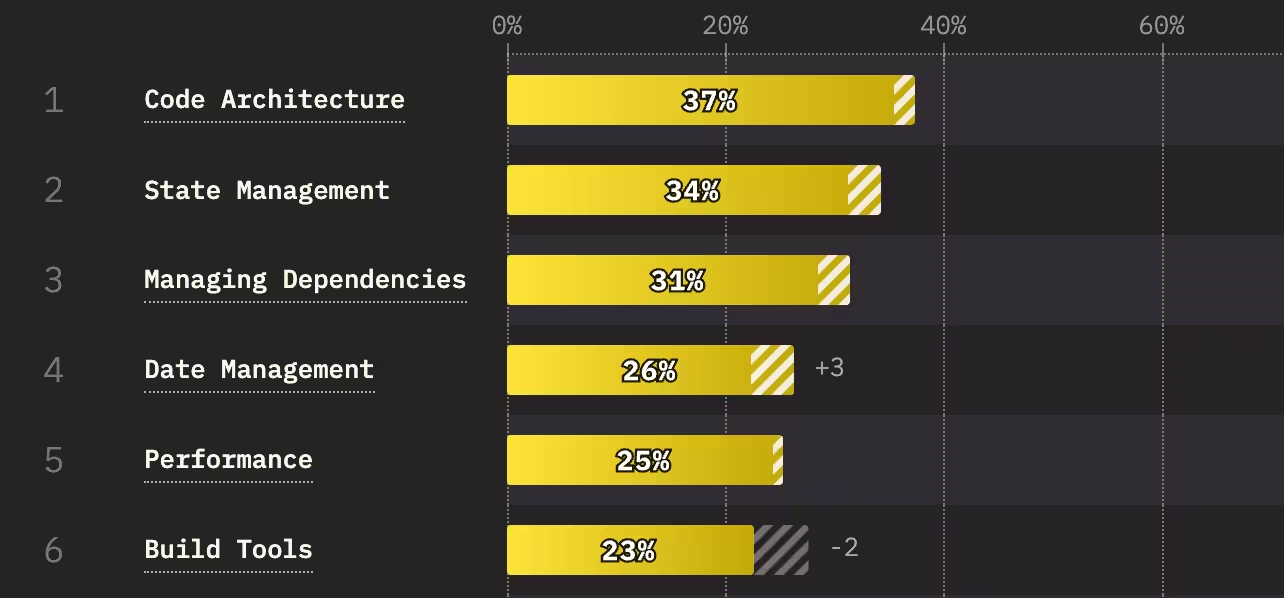
Tailwind, Typescript and JSX are ubiquitous, and they all require a build step, so this article might seem somewhat irrelevant. Frontend build tools have improved over time, yet developer satisfaction with them hasn’t changed since 2016, remaining at 3.6/5. Configuration, excessive complexity, and performance rank as the top build-tool pain points. When asked “What aspects of JavaScript do you struggle with the most?”, dealing with build tools ranked higher than async code, security and error handling.
Recently, the build of a project I was working on broke because the use of a perfectly valid CSS selector (::details-content::after) caused Lightning CSS to blow up (despite this selector being supported by all browsers). Every build tool has hundreds of open GitHub issues. On Stack Overflow there are 42497 questions about Webpack. That includes 10,845 questions that never received a single answer. My hope is that as web standards improve, build tools can become slimmer and simpler, because abandoning them altogether is not a good option on larger projects.